WooCommerce Fulfillment System
Stop managing WooCommerce orders manually
Inventory, orders, and shipping, all in one system.
No spreadsheets. No copy-paste. Always in sync.
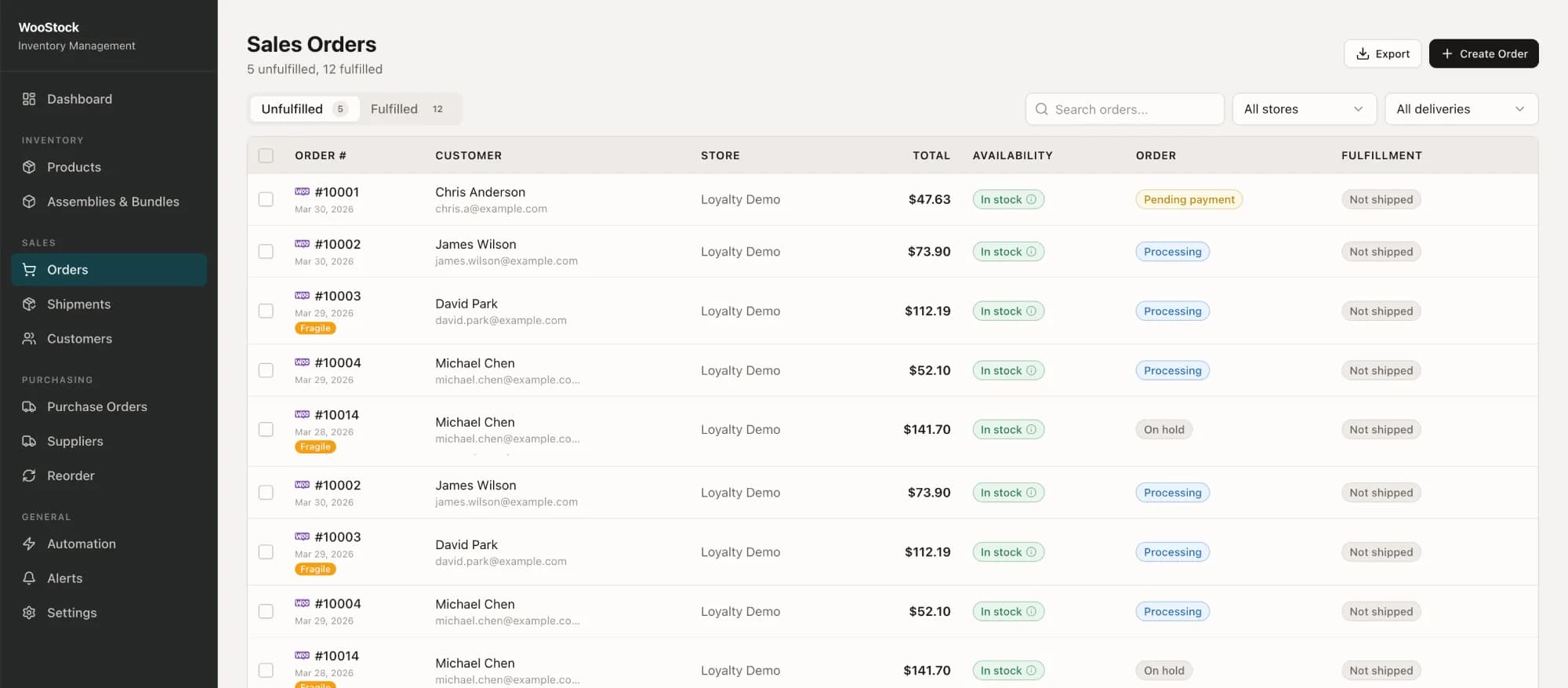
Still running fulfillment from spreadsheets and emails?
WooCommerce wasn't built for operations. Here's what breaks when you try to scale without a proper system.
Order Management Chaos
Orders arrive from WooCommerce and you manually copy details into spreadsheets, shipping platforms, and warehouse notes. Every new order means switching between tabs, re-entering data, and hoping nothing gets missed.
Common Pain Points
How it works
From WooCommerce order to shipped package automatically.
Connect your store
Connect WooCommerce in one click. Orders, products, and customers sync instantly.
Orders sync automatically
Every new order shows up in real time with all details — products, address, notes. Everything in one place.
Create shipments in seconds
Pick a carrier, generate labels, and assign items to shipments without leaving the system.
Pick, pack, and ship
Your warehouse gets clear instructions. Customers get tracking automatically. No confusion, no delays.
Everything you need to run fulfillment
Manage orders, inventory, shipping, and operations — without switching between tools.
From orders to shipping, everything works together in one system.
Order Management
See and manage all your WooCommerce orders in one place. Handle partial shipments, holds, and custom workflows without jumping between tools.
Inventory Control
Always know what's in stock across all locations. Prevent overselling with real-time updates, automatic reservations, and clear audit history.
Shipping & Labels
Generate shipping labels in seconds without leaving the system. Connect carriers, use templates, and create labels in bulk.
Purchasing & Reorders
Never run out of stock unexpectedly. Get smart reorder suggestions, create purchase orders, and track supplier deliveries.
Automation & Workflows
Automate repetitive tasks like stock updates, alerts, and order handling — so your team can focus on fulfillment, not busywork.
Integrations
Connect WooCommerce instantly and sync data across your stack. Support for multi-store setups, accounting tools, and real-time webhooks.
Works with your favorite tools
Native integrations with major carriers and tools. No middleware, no third-party connectors.

WooCommerce
Ecommerce platform

UPS
Shipping carrier

FedEx
Shipping carrier

DHL
International shipping

USPS
Postal service

QuickBooks
Accounting software
More integrations added regularly based on customer feedback.
Stop stacking plugins. Move fulfillment out.
WooCommerce is great for selling. But managing orders, inventory, and shipping inside it means slower pages, plugin conflicts, and constant workarounds.
The plugin stack
4-5 plugins to manage fulfillment
- WooCommerce slows down with every order — it was built for selling, not fulfillment
- Each plugin adds database queries, slowing your store for customers
- Plugins conflict with each other — updates break things constantly
- No single view of orders, inventory, and shipping — you jump between tabs
- Your store handles marketing, checkout, AND fulfillment — all competing for resources
The Fulfiro way
One system, outside your store
- Orders process off your store — WooCommerce stays fast for your customers
- One external system replaces 4-5 plugins — your store loads faster
- Everything is built to work together — no plugin conflicts, ever
- Orders, inventory, shipping, and warehouse in one dashboard
- WooCommerce does what it's best at: sales. Fulfiro handles the rest.
Let WooCommerce handle sales and marketing. Let Fulfiro handle everything after the order.
Built for WooCommerce — not adapted to it
Built for WooCommerce
Designed specifically for WooCommerce data, hooks, and workflows. Not a generic ERP adapted to fit.
Custom statuses & plugins
Works with your existing custom order statuses, plugins, and WooCommerce extensions.
No unnecessary complexity
You get fulfillment, inventory, and shipping. No ERP bloat, no features you will never use.
How WooCommerce actually works
Syncs with how WooCommerce operates — orders, products, stock, and webhooks.
Frequently asked questions
Everything you need to know about Fulfiro and how it works with WooCommerce.
After registration, you connect your store with one click using secure OAuth authentication -- no plugin needed. Once connected, orders, products, and inventory sync automatically in real time.
No -- that is the whole point. Fulfiro runs outside your store as a separate system. All fulfillment processing happens off your server, so your WooCommerce store stays fast for customers. The OAuth connection is lightweight and only fires on order events.
Yes. You can connect multiple WooCommerce stores to a single Fulfiro account and manage all orders, inventory, and shipments from one dashboard. Each store syncs independently.
Fulfiro integrates natively with UPS, FedEx, DHL, and USPS. You can generate labels, track shipments, and compare rates directly from the dashboard. More carriers are added regularly based on customer requests.
Not necessarily. Fulfiro works alongside your existing setup. However, once you start using Fulfiro for fulfillment, inventory, and shipping, you can typically remove 3-5 plugins that were handling those tasks individually -- which speeds up your store.
Yes. Fulfiro offers a free plan that includes core order management and inventory features for smaller stores. As your volume grows, you can upgrade to access advanced automation, multi-location inventory, and priority support.
Most stores are up and running in under 15 minutes. Register, connect your store with one click via OAuth, and your orders start syncing immediately. No developer required, no complex configuration.
Yes. You can split orders into multiple shipments, ship available items first, and track backorders separately. Customers receive tracking updates for each shipment automatically.
Ready to stop managing orders manually?
Join WooCommerce stores that are automating their fulfillment workflow with Fulfiro.