WooCommerce Status Mapping
WooCommerce stores often have custom order statuses from plugins (e.g., "New Quote Request" from YITH Quotes, "Awaiting Shipment" from ShipStation). Fulfiro's status mapping controls how each WooCommerce status affects inventory.
Default mapping
When you connect a store, Fulfiro auto-detects all WooCommerce order statuses and assigns defaults:
- Standard statuses (pending, processing, on-hold, completed, cancelled, refunded, failed) get their normal stock behavior
- Custom statuses default to "Ignore" (no stock impact). See Ignored Orders.
Editing the status map
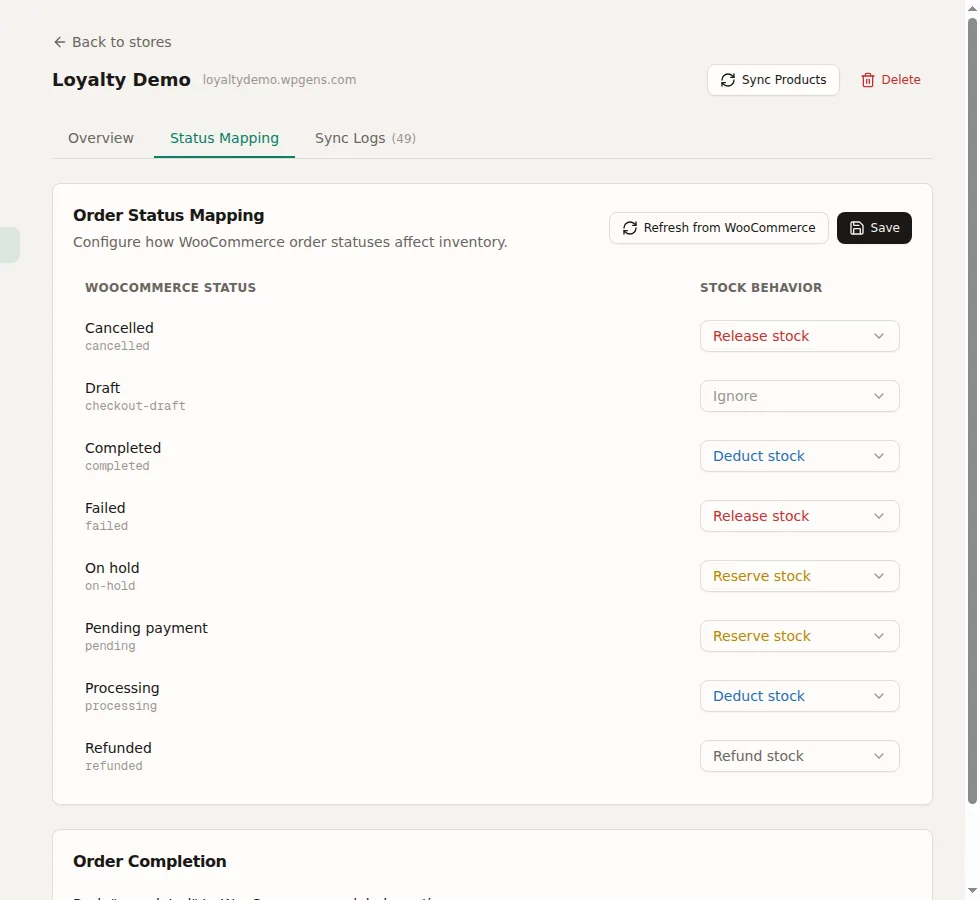
Go to Settings > Stores, click your store, and scroll to the Status Map section. For each WooCommerce status, select a behavior:
| Behavior | Effect |
|---|---|
| Reserve | Creates stock reservations (stock held but not deducted) |
| Deduct | Deducts stock from on-hand |
| Release | Releases reservations (returns stock to available) |
| Refund | Reverses stock deduction (returns stock to on-hand) |
| Ignore | No stock impact. See Ignored Orders. |
Refreshing the status map
Click Refresh from WooCommerce to pull any new custom statuses. Existing configurations are preserved; only new statuses are added (defaulting to Ignore).
Push completed on label
A toggle called "Push completed on label creation" controls whether Fulfiro automatically updates the WooCommerce order status to "completed" when you buy a shipping label. Default: on. See Tracking and Status Updates.